
A business card is not marketing, it is the start of a conversation. The card itself does little. What counts is what you do with it within a day. Left in a drawer, you printed it for nothing. Logged in your CRM with context and a follow-up date, it is one of the cheapest ways to hold on to a good conversation.
Why a card at all
When I registered Vanderwalt. with the Dutch Chamber of Commerce, business cards were not at the top of my list. Website, CRM, invoicing and terms came first. Even so, two weeks later an order for two hundred cards was at the printer. For three reasons:
- Not every conversation ends behind a screen: After an intro meeting or a networking event, handing over a card feels more natural than looking each other up on LinkedIn on the spot.
- It stays on the desk: A card on someone's desk is a reminder of the conversation. A new connection disappears among hundreds of others.
- It forces you to choose: 85 by 55 millimetres leaves no room for a story. You have to say what you do in one line. For a new business, that is a useful exercise.
What is on it, and what is not
The front is navy with the wordmark, the brand promise ("Control over your revenue within 90 days", in Dutch on the card) and the web address. The back is white, with my name, my role, what I do and how to reach me.
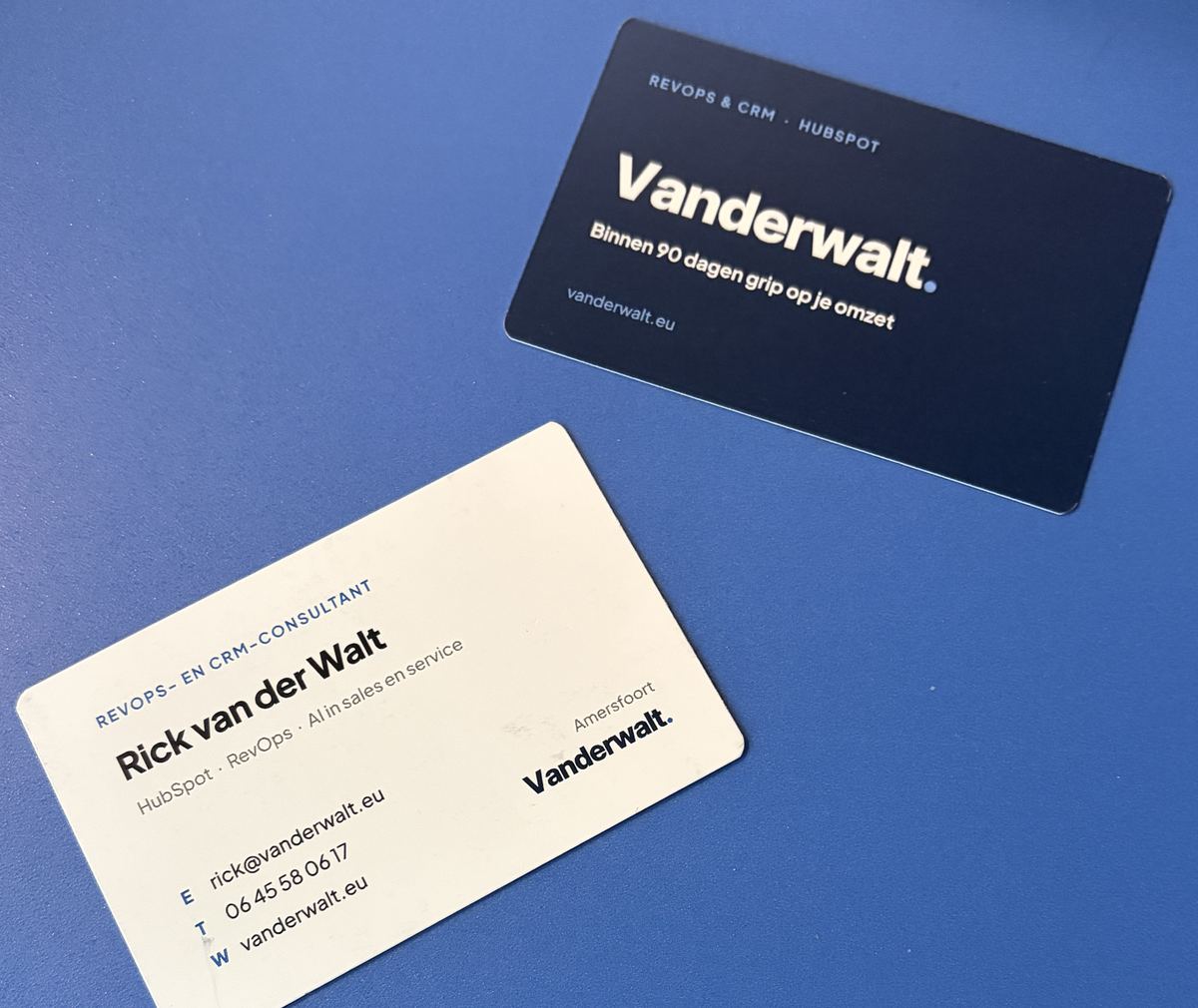
What is deliberately not on it:
- No partner or certification logos: A card lasts for years. It only says what is true today and will still be true in two years.
- No founder or director title: I work with clients myself. What matters is what I do, not what I call myself.
- No QR code: More on that below.
Print also teaches you something about your brand. The blue on the website, #0161EF, does not exist in printing ink. On paper it is a clean blue that is slightly less vivid than on screen. Nobody who receives the card will notice. But it is worth knowing before you print a flyer or letterhead.
An analogy: the shoebox of receipts
Every business owner knows the shoebox of receipts. Everything is kept, nothing is booked. When the tax return is due, half have faded and for the rest you no longer know what they were for.
A stack of business cards in a drawer is exactly that. You kept the contact, but without context. Where did you meet? What did you talk about? What were you going to do? Three weeks later it is a name without a story.
A card only becomes valuable once you book it: in your CRM, with context and a next step. Just like a receipt in your accounts.
The QR code: yes or no?
A QR code looks like the bridge between paper and digital. There are three common versions, each with its own drawback:
- QR to a vCard: The other person saves your details with one scan. Handy for them, but you never know it happened.
- QR to a form or your calendar: The other person leaves their details or books a meeting. That is measurable, but you are asking them to do the work while you are the one who wants something.
- QR to your website with a UTM tag: Your analytics show how many visits come from your cards. Just not from whom.
I left it off. After a good conversation, the follow-up is my job, not theirs. I have their details, so my card does not need to measure anything. It only has to make sure you can find me again. A name, a phone number and a web address are enough for that.
Want a QR code anyway? Point it at an address on your own domain, such as yourcompany.com/card, and redirect that to wherever you like. A card lasts for years, a link to a form or tool can change tomorrow. With your own redirect you can change the destination without reprinting.
The honest downsides
Paper goes out of date
In my first weeks in business I changed my business phone number more than once. Good thing I had not printed anything yet. Wait with cards until your details have been stable for a few weeks: name, number, domain and what you do.
Logging takes time
Every card you receive is a few minutes of work. After a busy event that adds up. If you do not want that, skip the card swap and connect on LinkedIn straight away.
A card measures nothing
You will never know how many of your cards end up in a drawer. That is fine, as long as you do log the cards you receive. That is where the value is.
From card to contact: five steps
This is the order I use myself, with HubSpot as my CRM. It works the same way in any other CRM.
- Log it within a day. After that you will have forgotten what the conversation was about. The HubSpot mobile app can scan a business card. That saves typing, but always check what it picked up.
- Capture the context. Where you met, what you discussed and what you agreed. Three sentences in a note are enough. Also record which event the contact came from, so you can see later which events are worth your time.
- Associate it with the company. A loose contact gets lost. Linked to the company, you immediately see whether there was earlier contact, and with whom.
- Create a task with a date. "Email the article we talked about" or "call after the holidays". An intention without a date is not follow-up.
- Follow up personally. One email from your own mailbox that refers to the conversation. No template and no automated sequence.
What this gives you is not extra revenue on day one. It is a CRM where, a year from now, you can see who you spoke to, where, and what came of it. See also what slow follow-up costs.
What a card is not
Someone who hands you a card expects you to get in touch about the conversation. That is fine. It is not a newsletter sign-up.
- Do: A personal email or phone call about what you discussed, or a LinkedIn request.
- Don't: Add the contact to your newsletter or an automated email sequence. That only works once someone signs up themselves. In my case always with a confirmation email (double opt-in).
- Record the source: Note in your CRM where the details came from. If someone asks later, you can show them.
- The paper: A drawer full of cards is also a collection of personal data. Throw a card away once it is logged, or store it properly.
This is not legal advice, just how I handle it myself under Dutch and EU rules.
Next steps
A business card is small, but it shows what RevOps is about: every touchpoint lands in one place and has a next step.
- Just getting started: The RevOps starter kit sets up your CRM, follow-up and reporting from your first customer.
- Join the conversation on LinkedIn: Do your cards end up in a drawer or in your CRM? Reply to the post about this article (in Dutch).
- See how I do it myself: How Vanderwalt. runs shows my own setup, including what is not finished yet.
- Get a clear picture first: With the RevOps quick scan I look at where contacts get stuck in your process.
Prefer to talk it through first? Book a 30-minute call. No sales pitch, just an honest look at how you hold on to contacts.